Latest News


YoutubeGet v5.0.5
YoutubeGet v5.0.5

Offering a multitude of methods to acquire the video, this application has all the power you need while still remaining small and easy to use. After downloading videos it will auto convert FLV files to MP4, 3GP, AVI, WMV, MOV etc. Soon, you can see youtube videos on your MP4 or mobile phone!

Password: www.2baksa.net

Cube Desktop Pro 1.3.1 latest and last edition
Posted by M4
on , under
Desktop
|
comments (0)

Cube Desktop Pro 1.3.1 *latest and last edition
Desktop creates six virtual and independent desktops, increasing the space you have to work and play. Being the most robust multiple desktop software, CubeDesktop solves the desktop clutter problem once and for all. Each virtual desktop is a distinct working environment. The taskbar shows only the applications opened on the current desktop, greatly reducing the clutter. Use the 3D cube to preview, switch or move windows to another desktop. Or just for fun.
Improve your Windows Vista experience. CubeDesktop is the best Vista addon so far, adding to your desktop incredible 2D and 3D effects.
Windows and desktops update in realtime, like Windows Vista new thumbnails, but in true 3D.
Impress everybody that looks at your computer and change the way you work with it!
Moving windows between desktops
CubeDesktop offers various ways to move applications amongst desktops.
Drag a window near the edge of the screen to show the 3D cube and drop it on the desktop of your choice.
"SendTo" menu items integrated into all applications' system menus allow you to send applications to the desired desktop.
You can also use hotkeys to move the selected window to another desktop.
System requirements :
Microsoft WindowsR XP? or WindowsR Vista?
1.4 Ghz processor
512 MB of RAM (1 GB recommended)
DirectX 9.0c
3D accelerated video adapter with at least 64MB of video memory
What's new in the latest release?
New effect 3D Desktop Roll
Stability enhacenments
New wallpaper and icon manager
Support for panoramic 360С� Compiz/Beryl SkyDomes
Button and axis invertion
Support for the Windows key in hotkeys
Automatically snap to the selected cube face
Minor features and bug corrections
ConceptDraw Mindmap 4.5.6


Use ConceptDraw MINDMAP for personal planning and note-taking, team brainstorming and demonstrations to audience. Personal version offers versatile mind mapping and drawing tools, and a rich collection of pre-drawn shapes. Professional version supports extra file formats, multi-page documents; it has extended capabilities for creating web sites and PowerPoint presentations.
MINDMAP Professional
If you are a project manager, team leader or company executive, sales or marketing manager, lecturer or researcher choose MINDMAP Professional and easily export MINDMAP files into MS Project and ConceptDraw Project documents, MS PowerPoint and ConceptDraw presentations, PDF documents.
Pro version also allows working with multi-page documents, edit and create your own libraries, import Outlook tasks and save templates and workspaces.
Smart Draw 2010

SmartDraw - The World's Most Popular Business Graphics software. Create professional-looking business graphics in minutes. No experience needed! SmartDraw's point-and-click drawing method makes it easy for anyone familiar with basic computer tasks to easily create professional-quality business graphics. SmartDraw lets you create the professional flowcharts, floor plans, org charts, technical diagrams, or calendars using our easy to use SmartTemplates. Plus, SmartDraw works hand in hand with Word, PowerPoint, Excel, and other tools. SmartDraw features dramatically improved graphics capability, with professionally designed gradients, textures, effects, styles, and themes. SmartDraw is software that helps you work smarter by communicating visually. Whether it's a flowchart to explain a business process, a Gantt chart to show a project schedule, or an organization chart, SmartDraw is unique because it draws more than 40 different types of visuals for you, including timelines, maps, charts, decision trees and floor plans.
With SmartDraw, anyone can create presentation-quality visuals in minutes. Because people are six times more likely to retain and understand information presented to them visually, SmartDraw helps millions of businesses increase their bottom line by improving communication, refining operations, completing projects on time, and successfully implementing their plans.
SmartDraw 2010:
• Dramatically reduces the time it takes to get your work done
• Allows you to manage your time and resources much more efficiently
• Gives you the power to create killer presentations with less effort
• And lets you collaborate effortlessly with your team members
Legal & Healthcare Content Now Included: In addition to hundreds of templates and examples for every type of visual, SmartDraw 2010 also includes all the premium legal and healthcare content that used to only be available in special editions. Now you get it all. Specialised healthcare content includes more than 150 high-resolution anatomical illustrations from Netter™ Images, plus thousands of healthcare and medical symbols of all kinds.
SmartDraw 2010 pushes the software performance envelope with dozens of new improvements that make creating visuals faster and easier than ever.
Here's what's new:
• The totally redesigned template browser in SmartDraw 2010 gets you started faster with an intuitive new way to find the right template or example for your project.
• Know exactly what you're looking for? The powerful new search feature is guaranteed to get you to the right template or example fast.
• Create your entire chart without taking your hands off the keyboard faster than ever with easier and better keyboard controls.
• With SmartDraw 2010 you'll create your organisation chart faster than ever, thanks to these two big improvements: Automatic Spacing: The spacing between boxes is now totally uniform and can be adjusted globally for the whole chart. Automatic Connector Lines: Easily rearrange your chart by dragging boxes below others. Connector lines appear automatically.
• Two big improvements that will help you diagram your workflows even faster than before: Shape Swap: This unique feature makes changing and editing your flowcharts, and other diagrams, easier than ever. Automatic Swimlanes: Swimlane flowcharts is one of the most useful tools for visualising and improving processes. With SmartDraw 2010, they're even easier to create by automating the swimlanes.
Get Projects Done On Time & Under Budget:
• The graphics engine under the hood of SmartDraw 2010 has been rebuilt into a high performance machine. This means that project charts—even those with hundreds of tasks and resources—appear almost instantaneously. No more waiting for a redraw each time you make a change to your chart.
• The more complex the project, the bigger the project chart. Smartdraw 2010 makes working with even large project charts easy because it allows you to hide and reveal any column in your chart.
• Tasks can be grouped hierarchically so that the length of the parent task reflects the length of all the sub tasks below. You can also "roll up" subtasks so that only the master task is shown—giving you a simpler view of your chart.
• Easily track the progress of your project by entering the percent complete for each task. Percent complete is shown visually on each task bar.
• You can now get a quick overview of your project with the new Timeline view.
• A mind map is the perfect tool for brainstorming. With SmartDraw you can use a mind map to come up with everything that needs to get done for your project. Once your project is completely scoped out, convert it to a project chart with a single click.
• Make one task start when another ends. Change the end date of the first task and the start date of the second changes automatically.
Create Killer Presentations:
• Using a graphic in a slide beats boring bullets every time, but revealing a graphic in a series of steps can increase comprehension tenfold. SmartDraw builds this in automatically.
• Plan out your presentation using SmartDraw's unique storyboard feature. Easily re-order your slides by dragging and dropping.
• Visuals communicate faster and more effectively than text alone. It's easy to add visuals—even other SmartDraw files—to your storyboard.
• SmartDraw 2010 allows you to select a slide layout for each slide you add to your storyboard—just like PowerPoint®.
• Once you've planned you presentation and laid it out in a storyboard, one simple step remains-to create your PowerPoint presentation. SmartDraw does it for you. Simply click Build and watch as SmartDraw builds your entire PowerPoint® presentation automatically.
Increase Collaberation for Team Success:
• SmartDraw 2010 gives you access to all your old Visio® files, plus new ones you receive from colleagues.
• SmartDraw 2010 now integrates with Microsoft SharePoint®, one of the most popular document management systems in the world.
• Avoid the inevitable and confusing collection of co-worker emails by putting all your review comments right into your SmartDraw document.
• SmartDraw is fully integrated with Microsoft Office®. With just one click, you can send your completed drawing directly to Word®, Excel®, or PowerPoint®.
• SmartDraw even integrates with Microsoft Project® so you can quickly and easily plan a complex project. Save your SmartDraw project chart in Microsoft Project® format to share with coworkers.
Registry Mechanic 9.0.0.114

With Registry Mechanic you can safely clean, repair and optimize the Windows registry with a few simple mouse clicks! Problems with the Windows registry are a common cause of Windows crashes, slow performance and error messages.
By using a registry cleaner regularly and fixing registry errors your system should not only be more stable but it will also help improve your system performance without expensive hardware upgrades. Learn more about the importance of a clean registry with our registry insight.
Registry Mechanic uses a high-performance detection algorithm that will quickly identify missing invalid references in the Windows registry.These problems can occur for many reasons including being left-behind after the un-installation or incorrect removal of software, by missing or corrupt hardware drivers, or orphaned startup programs.
With a few easy steps Registry Mechanic will scan your entire registry for any invalid entries and provides a list of the registry errors found, you can then choose to selectively clean each item or automatically repair them all. For your convenience and protection Registry Mechanic can also make a backup of any repairs made so that you can easily recover any changes if required.
Portable Spyware Cease v6.0.1
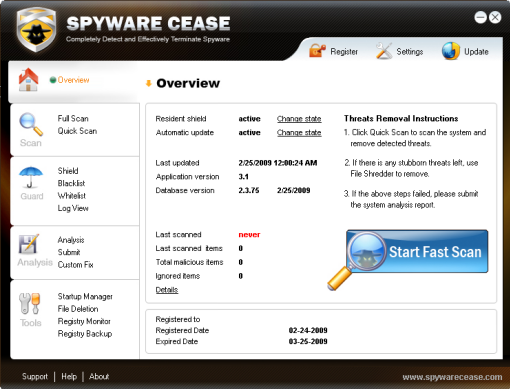
Spyware Cease effectively scans, removes and blocks spyware, trojans, keyloggers, adware, malicious tracking cookies, browser hijackers, worms, phishing attacks, rootkits, bots, malicious BHOs, dialers and many more spyware threats.
Spyware Cease is a powerful spyware and malware remover but consumes slightly computer resources. With Spyware Cease, you can safeguard PC security and enhance PC performance with ease.
Resume Maker Professional 15.0

Is your resume helping you move forward or holding you back?
Advance your career and never miss another career opportunity!
ResumeMaker� is packed with powerful features to help you write a better resume, land a better job, and earn a higher salary.
Whether you're actively searching for a job or just want to get your resume in shape, trust your resume and your career to ResumeMaker.
FAST & EASY
Professional Resumes That Get Results!
� Easy, STEP-BY-STEP Wizards
� Examples for 13,000+ Careers
� 150,000 Recommended Phrases
� IMPORT Your Existing Resume
� 1,000 Professional Resumes & Letters
POWERFUL
Job Search Tools That Give You The Advantage!
� Search 5 MILLION Job Openings
� Search 20 MILLION Companies
� Distribute at TOP 90+ Career Sites
� Salary & Negotiation Tips for 2,500 Careers
� JOB AGENTS! Get Jobs by E-mail
COMPLETE
Everything You Need to Advance Your Career!
� 500+ Virtual Interview Answers
� Contact Manager with MAIL MERGE
� FREE! Professional FONTS Inside
� Publish a WEB RESUME
� Create a PDF Resume & Burn your Portfolio to CD/DVD
Other brands of resume-writing software use a one-size-fits-all template.
ResumeMaker automatically determines the best resume for you, given your career situation.
Your resume stands out because it presents your skills, experience, and achievements in the best possible light and demonstrates how your unique abilities will benefit future employers.
It's a proven, professional system that uses the writing style and designs preferred by certified writers so you'll see instant results and advance your career more quickly!
Get Noticed. Get Hired!
Write resumes and cover letters that grab employers' attention and keep them interested.
Harness the power of thousands of recommended phrases, hundreds of real-world examples, dozens of professional styles and Insider Advice you won't find anywhere else.
Advance your Career!
Includes all the tools you need to earn a higher salary, organize your job search, and plan your career.
Practice for the interview and get valuable advice from career experts.
You'll wonder how you ever managed your career without it.
Web-Enabled Features!
Publish your resume as a FREE Web page at ResumeMaker.com.
Impress employers by e-mailing resumes that retain their original, professional format.
Distribute your resume to hiring companies and search job openings online with ResumeMaker's patented Internet features.
System Requirements
� Pentium� class PC or higher � Microsoft Windows� Vista, XP, Me, 2000, 98 � 32 MB RAM available � CD-ROM Drive � Sound card and Speakers � Modem or Internet connection � Mouse � Hard Disk Space Needed - 125 MB � 12 MB for Career Planner � Recommended - Fax software
1
2
AVG Free Edition

Product description :
Title: AVG Free Edition 9.0.698
Filename: avg_free_stf_en_90_698a1730.exe
File size: 72.56MB (76,089,216 bytes)
Requirements: Windows 2000 / XP / Vista / Windows7 / XP64 / Vista64 / Windows7 64
Languages: en-US
AVG Anti-Virus Free Edition is trusted antivirus and antispyware protection for Windows available to download for free. In addition, the new included LinkScanner� Active Surf-Shield checks web pages for threats at the only time that matters � when you're about to click that link.
AVG Anti-Virus Free has these following features:
* Award-winning antivirus and antispyware
* Real-time safe internet surfing and searching
* Quality proven by 80 million of users
* Easy to download, install and use
* Protection against viruses and spyware
* Compatible with Windows 7, Windows Vista and Windows XP
AVG Anti-Virus Free Edition is only available for single computer use for home and non commercial use.
Portable WinRAR 3.80
Posted by M4
on , under
Compression
|
comments (0)

WinRAR is a powerful archive manager. It can backup your data and reduce size of email attachments, decompress RAR, ZIP and other files downloaded from Internet and create new archives in RAR and ZIP file format.
Features of WinRAR:
- Using WinRAR puts you ahead of the crowd when it comes to compression by consistently making smaller archives than the competition, saving disk space and transmission costs.
- WinRAR provides complete support for RAR and ZIP archives and is able to unpack CAB, ARJ, LZH, TAR, GZ, ACE, UUE, BZ2, JAR, ISO, 7Z, Z archives.
- WinRAR offers a graphic interactive interface utilizing mouse and menus as well as the command line interface.
- WinRAR is easier to use than many other archivers with the inclusion of a special "Wizard" mode which allows instant access to the basic archiving functions through a simple question and answer procedure. This avoids confusion in the early stages of use.
- WinRAR offers you the benefit of industry strength archive encryption using AES (Advanced Encryption Standard) with a key of 128 bits.
- WinRAR supports files and archives up to 8,589 billion gigabytes in size. The number of archived files is, for all practical purposes, unlimited.
- WinRAR offers the ability to create selfextracting and multivolume archives.
Recovery record and recovery volumes allow to reconstruct even physically damaged archives.
- WinRAR features are constantly being developed to keep WinRAR ahead of the pack.
Changes in Version 3.80 beta 1:
1. Added support for ZIP archives containing Unicode file names in UTF-8 format. When creating ZIP archive, WinRAR stores names in Unicode only if they cannot be stored correctly using the current single byte character set.
2. Added decompression support for WinZip AES encrypted ZIP archives.
3. Improved Unicode support for RAR and ZIP archive names.
4. "Ask before overwrite" and "Skip existing files" update modes are now available in archiving dialog. They allow to specify WinRAR behavior when updating already existing files in archive. Unlike already available "Fresh existing files only" and "Add and update files", these new modes ignore file date and compare only file names.
Command line equivalents of these modes are:
a) switch -o enables "Ask before overwrite" archiving mode;
b) switch -o- enables "Skip existing files" archiving mode;
c) switch -o+ enables "Overwrite all" mode (default for archiving).
5. New "Add to con**** menu" option in "Profile parameters" dialog. If this option is on, the profile name will be displayed in Explorer con**** menus allowing to activate a profile from con**** menu.
6. New -cp switch allows to select a compression profile in command line mode. It is supported only by GUI WinRAR.exe, not by rar.exe.
7. New "Options" page of archiving dialog contains the group of settings modifying the behavior of "Delete files after archiving" option from "General" page:
a) Delete files. Delete files normally like in previous WinRAR versions.
b) Move files to Recycle Bin. Deleted files are placed to Recycle Bin. Command line equivalent of this option is -dr switch.
c) Wipe files. Before deleting file data are overwritten by zero bytes to prevent recovery of deleted files. Command line equivalent of this option is -dw switch.
All these options have an effect only if "Delete files after archiving" is on. You can enable any of these options in the default compression profile to change the default behavior of "Delete files after archiving".
8. WinRAR "Extraction path and options" dialog is now resizable. You can use the mouse to drag its border to the desired size and provide more space for folder tree pane. WinRAR will store new dimensions of this dialog.
9. New "Update" SFX script command and "Update mode" group of options in "Update" page of "Advanced SFX options" dialog. These command and options allow to check time and implement file time based updating;
10. SFX script "Shortcut" command and "Add shortcut..." command in "Advanced SFX options" dialog now allow to specify an icon file containing an icon associated with shortcut.
11. New "Wipe temporary files" option in "Settings/Security" dialog provides more secure, though slower, way to delete temporary WinRAR files.
12. WinRAR and RAR display the total progress bar when unpacking a multivolume RAR archive if all volumes are present in the same folder.
13. WinRAR and RAR automatically expand names of environment variables in list files. For example, a list file can contain lines like: %windir%\*.exe, %USERPROFILE%\Desktop
This feature is available only in Windows RAR version.
14. Added support of TAR archives with non-zero "extra field" data.
15. Added support of TAR archives, which does not contain the end of archive entry consisting of 512 zero bytes.
16. Improved Unicode support when dragging files from WinRAR window.
17. Shift+Tab key combination can be used in main WinRAR window to switch the input focus between interface elements (files, comment, tree, address) in reverse order. In previous versions Shift+Tab used the same order as Tab.
18. Corrected a possible WinRAR crash when opening truncated UDF ISO files
Xilisoft Video Converter Ultimate 5.1.3.1008
Posted by M4
on , under
Video Converter
|
comments (1)

Xilisoft Video Converter is powerful, versatile video conversion software which converts between all popular video formats such as convert AVI to MPEG, WMV to AVI, WMV to MPEG or H.264/AVC video, convert AVI files to iPod formats, etc.
No other programs like Xilisoft Video Converter supports so comprehensive video formats including AVI, MPEG, WMV, DivX, MP4, H.264/MPEG-4 AVC, RM, MOV, XviD, 3GP, FLV, VOB (the video format used in DVD), DAT (the video format used in VCD, SVCD), etc. In addition, the video converter provides an easy way to convert video file to popular audio file, like MP2, MP3, WMA, WAV, RA, M4A, AAC, AC3, OGG, etc. The video converter also supports APE, CUE decoding and audio CD ripping.
What's new in latest version:
- The newly added support for multi-core CPU makes the video conversion much quicker;
- Now you can add and adjust subtitle files (ASS, SSA or SRT format) to get video files with adjusted subtitle;
- Directshow decoding gets supported in the new version;
- Better conversion video and audio quality is offered now;
- Clip segments from video and audio, and output them respectively or merge them into one;
- Video editing functions added: crop video size, add watermark, and adjust effects;
- Preview clipped segment and fixed video, and even preview source video and fixed video for comparison;
- Multiple profiles can be set for one original to convert, and more optimized profiles are offered for PSP and other digital devices;
- Capture picture from video and create video from pictures;
- A Bitrate Calculator is available for you to customize the output file size exactly.
Main Functions:
- Act as 3GP Video Converter, iPod Video Converter, PSP Video Converter, Zune Video Converter, AVI MPEG Converter, MP4 Video Converter, MOV Converter, MKV to MPEG converter, etc.;
- Convert between all popular video formats including AVI, MPEG, WMV, DivX, MP4, H.264/MPEG-4 AVC, RM, MOV, XviD, 3GP, FLV, help you on how to convert AVI to MPEG, convert MKV to AVI, convert MKV to MPEG;
- Convert videos to popular audio files, including MP2, MP3, WMA, WAV, RA, M4A, AAC, AC3, and OGG, and convert between these audio formats;
- Extract pictures from video and output them as JPG, PNG, GIF, BMP, SWF;
- Convert pictures to video formats like AVI, FLV, SWF, MOV, 3GP, WMV, etc.
Key Features:
- Powerful video effect editing functions to customize your video: crop video size, edit video effects, and add video watermark; (Ultimate only)
- Support the decoding and encoding of lossless audio; (Ultimate only)
- Preview and compare the source video and fixed video; (Ultimate only)
- Merge several files or clipped segments to one for conversion; (Ultimate and Platinum only)
- Clip segments from video and audio, and output them respectively or merge them into one for output; (Ultimate and Platinum only)
- Preview clipped video segment; (Ultimate and Platinum only)
- More optimized and classified profiles are supported now, and any profile can be customized to create your own one with your favorite settings;
- Customize the output file size and auto-calculate corresponding video bit rate;
- Multiple output formats can be set for one original to facilitate your conversion;
- Convert videos to compatible formats to work on PSP, PS3, iPod, iPhone, Apple TV, Zune, Archos, blackberry, iRiver PMP, Creative Zen, etc.;
- It supports H.264/AVC video format, PSP H.264/MPEG-4 AVC encoding/decoding, PSP H.264/AVC Video (480x272) (*.mp4);
- It provides batch conversion and multithreading, thus you can select multiple files at one time to have them convert one by one automatically;
- You can convert any clip or segment of the video at will by setting the start point and duration, and split one source file to several by duration or file size;
- video codec and audio codec can be modified: alternatively select video codec such as MPEG4, DVvideo, Mjpeg, etc. for AVI, H263, and MPEG4 for 3GP, as well as audio codec like PCM, MP2, MP3, MPEGAAC, AC3, etc.
- When converting files, you can pause, stop and continue at any moment;
- You can keep the default settings or set parameters of the video and audio by yourself to get particular effects for output file
PC Tools Disk Suite 2009 1.0.0.66

With Disk Suite you can safely Cleanup and Optimize your Windows® disks with a few simple mouse clicks. Disks can become bloated with temporary files, log files and other unnecessary data. The Cleanup and Optimize feature lets you safely remove unnecessary files and bloat from your PC without detailed knowledge of the Windows® file system. Removing bloat will not only make your PC perform better, but will also provide you with more free space to store your own files.[/b]
SUPERAntiSpyware Professional 4.15.1000
 SUPERAntiSpyware is the most thorough scanner on the market. Our Multi-Dimensional Scanning and Process Interrogation Technology will detect spyware other products miss. Easily remove pests such as WinFixer, SpyAxe, SpyFalcon, and thousands more. SUPERAntiSpyware will detect and remove thousands of Spyware, Adware, Malware, Trojans, KeyLoggers, Dialers, Hi-Jackers, and Worms. SUPERAntiSpyware features many unique and powerful technologies and removes spyware threats that other applications fail to remove.
SUPERAntiSpyware Professional includes Real-Time Blocking of threats, Scheduled Scanning, and Free Unlimited Customer Service via e-mail. Also includes a Repair feature that allows you to restore various settings which are often changed by malware programs, but usually not corrected by simply removing the parasite. Repair broken Internet Connections, Desktops, Registry Editing and more with our unique Repair System. Dedicated Threat Research Team scours the web for new threats and provides daily definition updates.
Easily remove over 1 million pests and threat components such as VirusRay, AntiVirGear, VirusProtectPro, DriveCleaner, SmitFraud, Vundo, WinFixer, SpyAxe, SpyFalcon, WinAntiVirus, AntiVermins, AntiSpyGolden and thousands more!
Features:
SUPERAntiSpyware Professional features many unique technologies including:
� Quick, Complete and Custom Scanning of Hard Drives, Removable Drives, Memory, Registry, Individual Folders and More! Includes Trusting Items and Excluding Folders for complete customization of scanning!
� Detect and Remove Spyware, Adware, Malware, Trojans, Dialers, Worms, KeyLoggers, HiJackers and many other types of threats.
� Light on System Resources and won't slow down your computer like many other anti-spyware products. Won't conflict with your existing anti-spyware or anti-virus solution!
� Repair broken Internet Connections, Desktops, Registry Editing and more with our unique Repair System!
� Real-Time Blocking of threats! Prevent potentially harmful software from installing or re-installing!
� Multi-Dimensional Scanning detects existing threats as well as threats of the future by analyzing threat characteristics in addition to code patterns.
� First Chance Prevention examines over 50 critical points of your system each time your system starts up and shuts down to eliminate threats before they have a chance to infect and infiltrate your system.
� Process Interrogation Technology allows threats to be detected no matter where they are hiding on your system.
� Schedule either Quick, Complete or Custom Scans Daily or Weekly to ensure your computer is free from harmful software.
� Dedicated Threat Research Team scours the web for new threats and provides daily definition updates.
Works on Windows 98, 98SE, ME, 2000, XP, Vista or Windows 2003.
Changes in Version 4.15.1000, 05/29/2008:
Technology Changes
* Improved scanning performance (speed)
* Enhanced Direct Disk Access (DDA)
* Improved scanning engine for detection of rootkit items
* Improved detection of packed/compressed threats
* Resolved rare issues with DDA (Direct Disk Access) and improved compatibility with various NTFS formats
* Resolved rare crash issues with improperly written drivers (mainly spyware) that caused Kernel Direct to fault
* Firefox cookie scanning and removal
User Interface Changes
* Vista UAC Issues Resolved - You should not be prompted by UAC on Admin or Limited user account under Vista. You cannot install program updates on a Limited Account as this breaks the Admin/Limited use paradigm.
* Windows "No Disk" issues resolved - this a Windows error due to it's caching of disk volumes - this no longer should show up for empty CD/DVD driver, flash drives, etc.
* You may now disable the Splash screen in the Free and Professional Editions
Size: 5,35 MB
beautywheels


